Most AI features fail in the same way. The demo looks great, the prompt lives somewhere in the code, and a month later nobody can say why the model wrote nonsense in 3% of cases, how much it costs per day, or who is allowed to change its behaviour. The model is rarely the problem. The problem is that the business has no control panel for it.
In this article I walk through one concrete AI workflow and the custom admin panel around it. The example is an online store that receives thousands of products from suppliers and needs clean product cards. The same structure works for processing leads, documents, support tickets or content moderation, and it is the kind of system I design and build for clients from the first prompt to production.
The task
A store sells shoes and clothing from a dozen suppliers. Every week it receives price lists with rows like "Snkrs men NB 574 gry sz42, upper: textile/gen. leather". The catalog has 5,000 products, and every product needs a clean title, a category from the store's tree, structured attributes for filters (colour, size, material, sole), and a description in Ukrainian and English. Done by hand, this is weeks of copywriting and a constant backlog. Done by "just send it to ChatGPT", it is fast, but nobody trusts the result.
The goal is not to remove people. The goal is to let the model do 80-90% of routine work, make every questionable case visible to an editor, and give the owner clear numbers: quality, speed and cost.
The workflow, step by step
1. Import and job queue. Supplier files are parsed into rows, each row becomes a job in a queue with a status: new, processing, waiting for review, published, rejected. Jobs are idempotent: if the same file is uploaded twice or a worker crashes halfway, nothing is duplicated and nothing is lost. This is boring infrastructure, and it is exactly what demos skip.
2. Attribute extraction. The first LLM call does one thing: turns the supplier row into JSON that matches a strict schema. Title, brand, category, colour, size, materials. The key rule in the prompt is that a value may only come from the input. If a field is not there, the model returns null instead of guessing. Structured output plus a schema check turns the model from a creative writer into a careful data clerk.
3. Description. The second call writes the product text from the already verified attributes, not from the raw row. That separation matters: the description cannot invent a material that is not in the attributes, and the writing style can be tuned without touching extraction.
4. Automatic checks. Before anything reaches the store, code checks the result: JSON matches the schema, every attribute value can be traced back to the input, the category exists in the store tree, the description fits the length limits and contains no banned claims, and the product is not a duplicate. The model also returns a confidence score. Cards that pass every check and have high confidence are published automatically. Everything else goes to a person.
5. Human review. An editor sees the supplier input and the model output side by side, with the problem highlighted. One click approves, edits a field, regenerates with a comment, or rejects. Every edit is saved, and that is where the system starts learning.
What the admin panel does
The admin panel is not a decoration over the pipeline. It is where the business manages the AI without asking a developer. In this project it has four main screens.
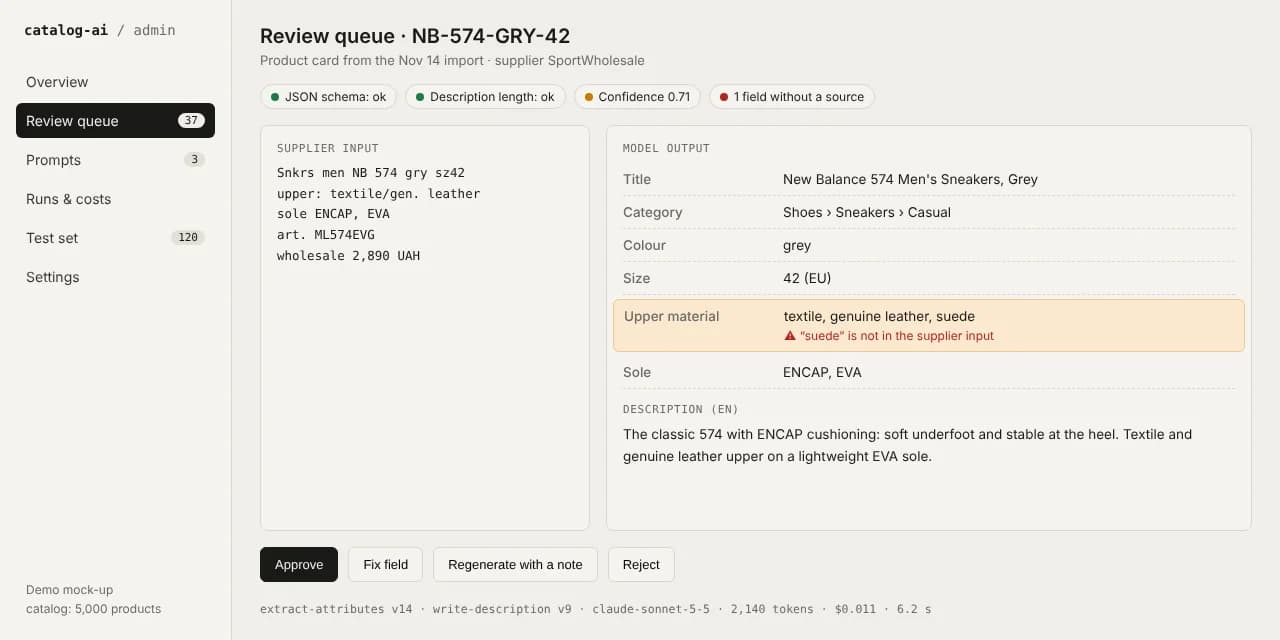
Review queue. The editor works through only the cards that need attention, not all 5,000. Each card shows why it is in the queue: low confidence, a field without a source, a new category, a possible duplicate. At the bottom is the full technical trace: which prompt versions and model were used, how many tokens it took and what it cost. When something goes wrong, there is no guessing.
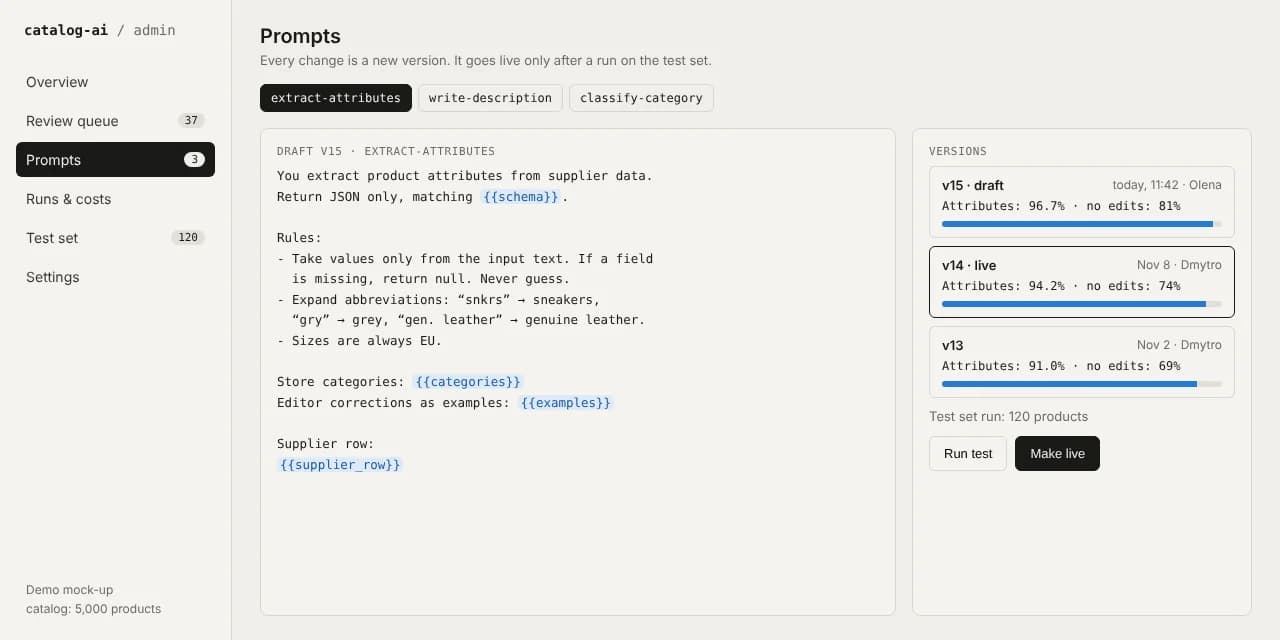
Prompts with versions. Prompts are stored in the database, not in the code. Every change creates a new version with an author and a date, and you can roll back in one click. A new version cannot go live until it has been run on the test set: about a hundred products with known correct answers. The panel shows attribute accuracy and the share of cards approved without edits, compared to the current version. This removes the most dangerous habit in AI products, which is fixing one bad case and quietly breaking ten good ones.
Test set. This is the list of reference products the system is measured against. It grows from real work: when an editor fixes a tricky card, it can be added to the test set in one click. Over time, the set covers exactly the cases where the model used to make mistakes.
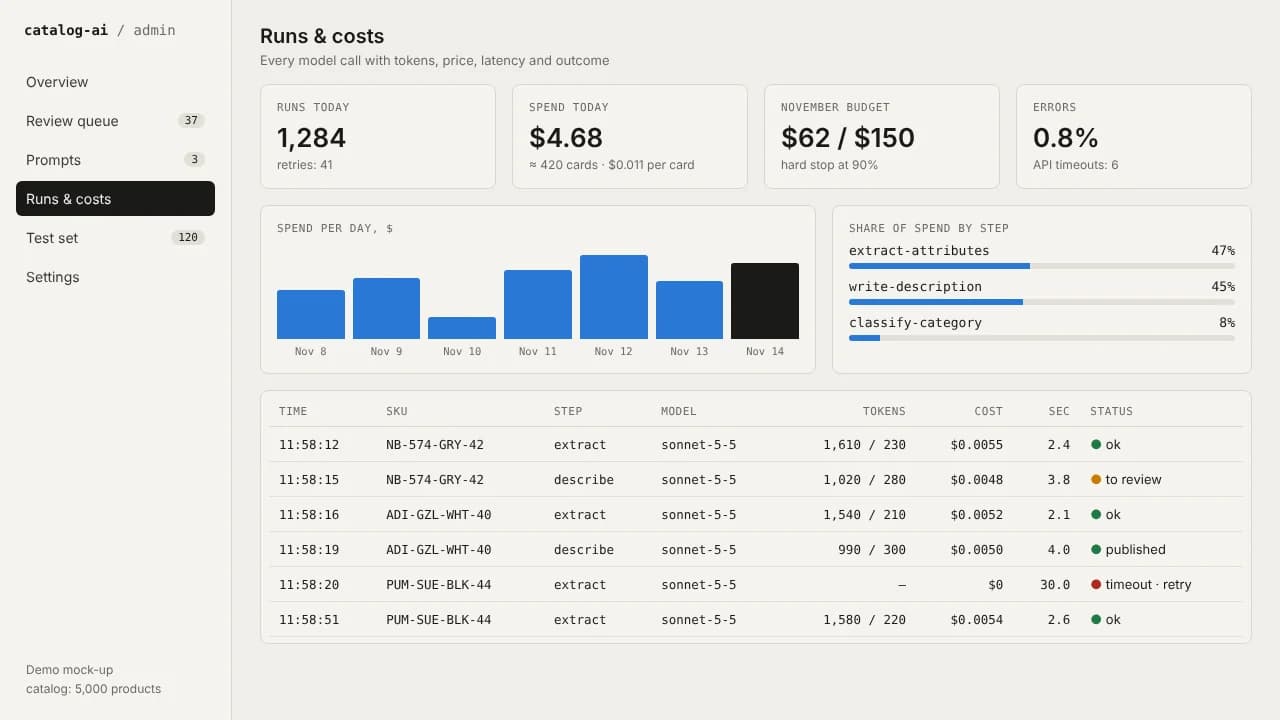
Runs and costs. Every model call is logged: input, output, tokens, price, latency, errors and retries. The owner sees spend per day, per pipeline step and per product, and sets a monthly budget with a hard stop. If a supplier sends a broken file and the system starts retrying in a loop, it stops at the limit instead of burning through the account overnight. For deeper tracing I often connect Langfuse, which I described in a separate article: https://zavada.dev/blog/langfuse-what-it-is-and-how-to-use-it
Settings and roles. Which model is used for which step, confidence thresholds for auto-publishing, banned words, length limits. Roles decide who can edit prompts, who can only review cards, and who sees costs. An editor should not accidentally switch the whole catalog to a more expensive model.
How human edits make the system better
Human-in-the-loop is not just a person pressing "approve". The value is in what happens to their edits. In this workflow, editor corrections flow back in three ways. First, the best corrections become examples inside the prompt, so the model sees how this store wants things written. Second, hard cases are added to the test set, so the next prompt version is measured against them. Third, the panel tracks the share of cards approved without edits. When it grows from 70% to 85%, the owner sees that the system is improving, and can raise the auto-publish threshold.
| Decision | Who makes it | Why |
|---|---|---|
| Extract attributes from a supplier row | Model | Routine, high volume, easy to check |
| Check schema, sources, duplicates | Code | Deterministic rules are cheaper and more reliable than a second model |
| Publish a card with high confidence | System, automatically | The threshold is set and adjusted by people |
| Fix a doubtful or new case | Editor | Context and responsibility for what the customer sees |
| Change a prompt or model | Owner or lead | Only after a run on the test set |
What it costs to run
Here is a rough estimate for this example with a mid-range model at $2 per million input tokens and $10 per million output tokens. One product card takes three calls and about 4,000 input and 800 output tokens in total, so roughly $0.01-0.02 per card. The full catalog of 5,000 products costs about $50-100 including retries, and weekly updates of a few hundred products cost a few dollars. The model is almost never the main cost. The main cost is the engineering that makes the result reliable: the queue, checks, the review process and the admin panel. That is also what pays back, because it replaces weeks of manual work with a few hours of review.
Treat these numbers as an order of magnitude, not a quote. Model prices change, and token counts depend on how long your inputs and texts are. The point of the costs screen is that you see the real figures from day one instead of estimates.
Stack
A typical setup looks like this: the admin panel on Next.js with roles and authorization; a worker on Node.js or Python that processes the queue; PostgreSQL for products, jobs, prompt versions and logs; Redis with BullMQ for the queue and retries; the Claude or OpenAI API with structured output; Langfuse for tracing when the volume grows. Nothing exotic. The value is not in rare tools but in how the steps, checks and screens fit together.
Mistakes I see most often
One giant prompt that does everything. When it breaks, you cannot tell which part failed. Small steps with their own checks are easier to debug and cheaper to improve.
Prompts in the code. Every wording change becomes a deploy, and the people who understand the content cannot touch it. Prompts belong in the admin panel with versions.
No test set. Without it, every prompt change is a guess. With it, you see in ten minutes whether the new version is better.
No cost limits. An unexpected loop or a broken file can cost more in one night than a month of normal work. A budget with a hard stop is a must, not a nice-to-have.
Reviewing everything or nothing. If people check every card, AI saves nothing. If nobody checks anything, mistakes reach customers. The right answer is thresholds and a queue of only the doubtful cases.
Where else this pattern works
The structure "small model steps, automatic checks, review queue, admin panel with prompts and costs" fits many tasks: sorting incoming leads and drafting replies, extracting data from invoices and contracts, moderating user content, preparing answers for support, generating SEO pages from a database. The steps change, the control panel stays the same.
If you want to put an AI workflow into a real business process and keep it under control, send me a short description: what comes in, what should come out, and who checks the result now. I will reply with a plan for the first version, the risks I see and a rough cost to run it.
Need a developer for the long run?
I can start now and work with you for months or years, not hand off after two weeks. Send me a message and we will talk through your project, requirements and next steps.